Exploring pipeline data#
Imports#
import pyopia.background
import pyopia.classify
import pyopia.instrument.silcam
import pyopia.instrument.holo
import pyopia.io
import pyopia.pipeline
import pyopia.plotting
import pyopia.process
import pyopia.statistics
import pyopia.exampledata

import os
import matplotlib.pyplot as plt
Installation note:#
These examples use ‘classification’ optional dependencies, which you should have installed (see here).
Setup and run a pipeline as normal#
model_path = pyopia.exampledata.get_example_model(os.getcwd())

# Prepare folders
os.makedirs('proc', exist_ok=True)

# remove pre-existing output file (as statistics for each image are appended to it)
datafile_nc = os.path.join('proc', 'test')
if os.path.isfile(datafile_nc + '-STATS.nc'):
  os.remove(datafile_nc + '-STATS.nc')

toml_settings = pyopia.io.load_toml('config.toml')

# Initialise the pipeline and run the initial steps
MyPipeline = pyopia.pipeline.Pipeline(toml_settings)

# Load an image (from the test suite)
filename = pyopia.exampledata.get_example_silc_image(os.getcwd())

# Process the image to obtain the stats dataframe
MyPipeline.run(filename)
stats = MyPipeline.data['stats']
Show code cell output
Initialising pipeline
WARNING: Classification assumes loaded images have values in the range 0-255
Classify  ready with: {'model_path': 'keras_model.h5'}  and data dict_keys(['cl', 'settings', 'skip_next_steps', 'raw_files'])
Example image already exists. Skipping download.
SilCamLoad  ready with: {}  and data dict_keys(['cl', 'settings', 'skip_next_steps', 'raw_files', 'filename'])
ImagePrep  ready with: {'image_level': 'imraw'}  and data dict_keys(['cl', 'settings', 'skip_next_steps', 'raw_files', 'filename', 'timestamp', 'imraw'])
Segment  ready with: {'threshold': 0.85, 'segment_source': 'im_minimum'}  and data dict_keys(['cl', 'settings', 'skip_next_steps', 'raw_files', 'filename', 'timestamp', 'imraw', 'im_minimum', 'imref'])
segment
clean
CalculateStats  ready with: {'export_outputpath': 'silcam_rois', 'roi_source': 'imref'}  and data dict_keys(['cl', 'settings', 'skip_next_steps', 'raw_files', 'filename', 'timestamp', 'imraw', 'im_minimum', 'imref', 'imbw'])
statextract
21.7% saturation
measure
  870 particles found
EXTRACTING 870 IMAGES from 870
StatsToDisc  ready with: {'output_datafile': './test'}  and data dict_keys(['cl', 'settings', 'skip_next_steps', 'raw_files', 'filename', 'timestamp', 'imraw', 'im_minimum', 'imref', 'imbw', 'stats'])
Pipeline data available#
Now the pipeline has finished, we can look at the keys in Pipeline.data to see what is available.
Full documentation is here: pyopia.pipeline.Data
print(MyPipeline.data.keys())
dict_keys(['cl', 'settings', 'skip_next_steps', 'raw_files', 'filename', 'timestamp', 'imraw', 'im_minimum', 'imref', 'imbw', 'stats'])
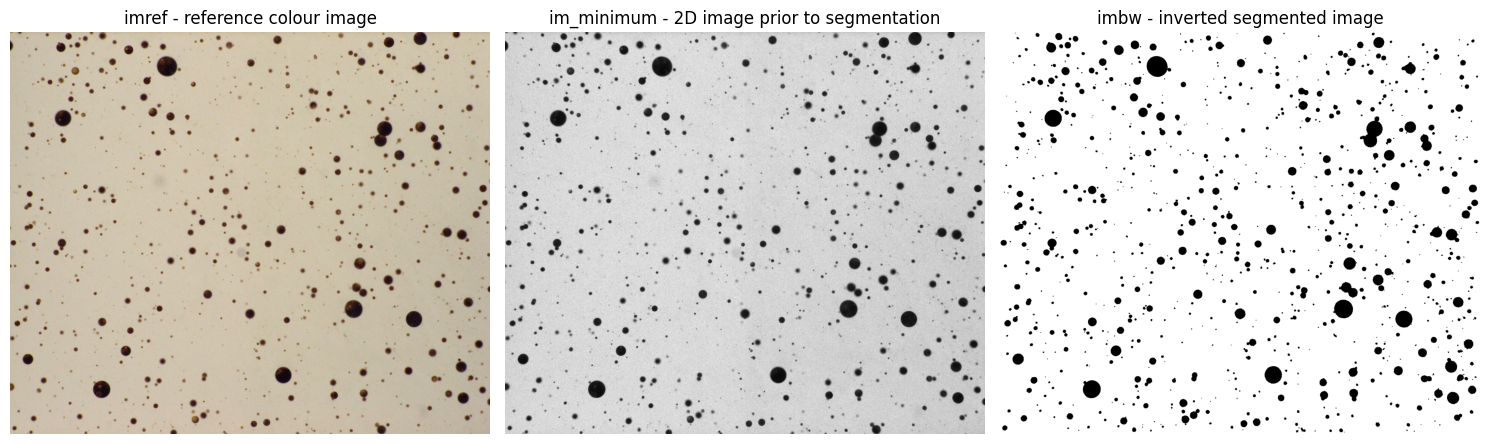
Visualise the reference, 2-D corrected image, and segmented image#
This helps us see the quality of the image that is passed to the pipeline, and how well the segmentation performed in separating particles from the background.
f, a = plt.subplots(1,3, figsize=(15,10))

a[0].imshow(MyPipeline.data['imref'], cmap='grey')
a[0].set_title('imref - reference colour image')
a[0].axis('off')
a[1].imshow(MyPipeline.data['im_minimum'], cmap='grey')
a[1].set_title('im_minimum - 2D image prior to segmentation')
a[1].axis('off')
a[2].imshow(~MyPipeline.data['imbw'], cmap='grey')
a[2].set_title('imbw - inverted segmented image')
a[2].axis('off')
plt.tight_layout()
Check classified size distribution statistics#
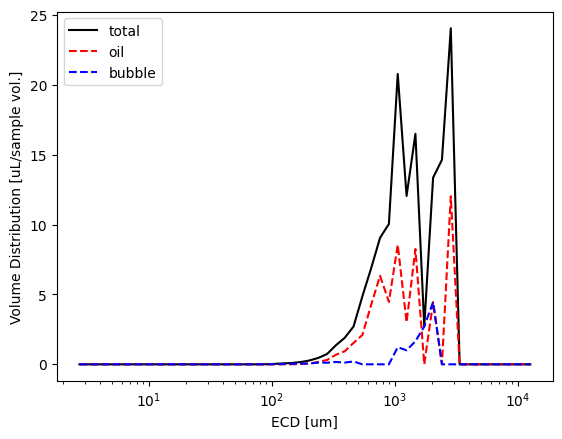
Now we can quickly plot the some size distributions and check what the classifier returned
MyPipeline.data['xstats'] = pyopia.io.make_xstats(MyPipeline.data['stats'], toml_settings)
xstats = MyPipeline.data['xstats']
dias, vd_total = pyopia.statistics.vd_from_stats(xstats, pyopia.pipeline.steps_from_xstats(xstats)['general']['pixel_size'])

stats = MyPipeline.data['stats']
oil = stats[stats['probability_oil'] > 0.5] # a very cruide extraction of particles with moderate probability of being oil
bubble = stats[stats['probability_bubble'] > 0.5] # a very cruide extraction of particles with moderate probability of being bubbles

dias, vd_oil = pyopia.statistics.vd_from_stats(oil, pyopia.pipeline.steps_from_xstats(xstats)['general']['pixel_size'])
dias, vd_bubble = pyopia.statistics.vd_from_stats(bubble, pyopia.pipeline.steps_from_xstats(xstats)['general']['pixel_size'])


plt.plot(dias, vd_total, 'k', label=f"total")
plt.plot(dias, vd_oil, '--', color='r', label="oil")
plt.plot(dias, vd_bubble, '--', color='b', label="bubble")
plt.xscale('log')
plt.xlabel('ECD [um]')
plt.ylabel('Volume Distribution [uL/sample vol.]')
plt.legend();
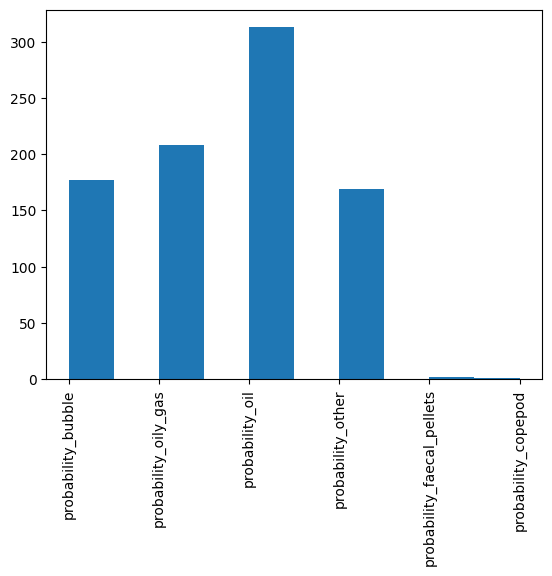
Crude classification histogram#
We take take a look at a summary of the number frequency distribution of the highest probability class from the classifier like this.
Note: Often for oil and bubbles, we work with volume distributions - the below histogram is number-based so will be biassed towards the very smallest particles for typical droplet size distributions.
stats = pyopia.statistics.add_best_guesses_to_stats(stats)

plt.hist(stats['best guess'])
plt.xticks(rotation=90);