The STATS NetCDF files#
How to use Xarray with the -STATS.nc NetCDF files
Loading processed data from disc using Xarray#
This is data that would normally be written by pyopia.io.make_xstats() or at the end of a processing pipeline (see pyopia.pipeline.Pipeline)
xstats = pyopia.io.load_stats('test-STATS.nc')
xstats
<xarray.Dataset>
Dimensions:                     (index: 15660)
Coordinates:
  * index                       (index) int32 0 1 2 3 4 ... 865 866 867 868 869
    time                        (index) datetime64[ns] 2018-11-01T14:27:31.83...
Data variables: (12/17)
    export name                 (index) object 'D20181101T142731.838206-PN0' ...
    major_axis_length           (index) float64 6.176 15.52 21.23 ... 6.34 5.779
    minor_axis_length           (index) float64 2.744 13.09 ... 4.598 2.874
    equivalent_diameter         (index) float64 3.909 14.14 ... 5.412 4.068
    minr                        (index) float64 3.0 3.0 ... 2.033e+03 2.037e+03
    minc                        (index) float64 77.0 1.896e+03 ... 1.754e+03
    ...                          ...
    probability_faecal_pellets  (index) float64 0.004881 2.016e-06 ... 2.448e-06
    probability_copepod         (index) float64 0.003022 7.33e-06 ... 7.925e-07
    probability_diatom_chain    (index) float64 0.004415 2.536e-06 ... 2.966e-06
    probability_oily_gas        (index) float64 0.106 0.0222 ... 1.357e-05
    timestamp                   (index) datetime64[ns] 2018-11-01T14:27:31.83...
    saturation                  (index) float64 21.67 21.67 ... 21.67 21.67
Attributes:
    steps:           [general]\nraw_files = "raw_data/*.silc"\npixel_size = 2...
    Modified:        2024-08-09 07:59:40.392013
PyOpia version: 1.1.4Access the settings used to process the data#
This is metada contained within the ‘steps’ attribute. pyopia.pipeline.steps_from_xstats() can extract this from the xarray for you:
toml_steps = pyopia.pipeline.steps_from_xstats(xstats)
toml_steps
{'general': {'raw_files': 'raw_data/*.silc', 'pixel_size': 24},
 'steps': {'classifier': {'pipeline_class': 'pyopia.classify.Classify',
   'model_path': 'keras_model.h5'},
  'load': {'pipeline_class': 'pyopia.instrument.silcam.SilCamLoad'},
  'imageprep': {'pipeline_class': 'pyopia.instrument.silcam.ImagePrep',
   'image_level': 'imraw'},
  'segmentation': {'pipeline_class': 'pyopia.process.Segment',
   'threshold': 0.85},
  'statextract': {'pipeline_class': 'pyopia.process.CalculateStats'},
  'output': {'pipeline_class': 'pyopia.io.StatsToDisc',
   'output_datafile': './test'}}}
You can use this to modify settings, or re-process a dataset using pyopia.pipeline.Pipeline
Or you might want to access some other metadata, such as pixel size, for use in analysis:
toml_steps['general']['pixel_size']
24
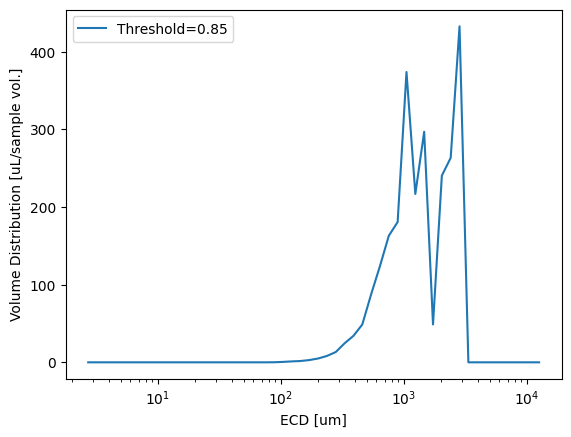
We can plot directly from xarray in exactly the same way as from the Pandas DataFrame (so it doesn’t matter which you use here). The benefit of ‘xstats’ as an xarray is that it now contains it’s own metadata
import matplotlib.pyplot as plt

dias, vd = pyopia.statistics.vd_from_stats(xstats, toml_steps['general']['pixel_size'])

plt.plot(dias, vd, label=f"Threshold={toml_steps['steps']['segmentation']['threshold']}")
plt.xscale('log')
plt.xlabel('ECD [um]')
plt.ylabel('Volume Distribution [uL/sample vol.]')
plt.legend()
plt.show()